
01 / FROM THE PICTURE
A change list from the picture.
CutTrace reads the picture layers of both AAFs, not the editor’s audio clips, and reports how many frames and samples each section moved.
FOR POST-PRODUCTION AUDIO TEAMS
CutTrace compares the old and new picture-lock AAF of a reel and works out what happened to every part of the cut. Then it helps you carry that change over to your Pro Tools session.
Early access · Version 0.7.0 · macOS 12 or later
CutTrace is not a finished product yet. The automatic Pro Tools reconform has so far been validated only against a simulated Pro Tools server. Acceptance testing on real Pro Tools hasn’t been done yet. Until it has, run the reconform only on a disposable copy of a session.
WHEN THE PICTURE CHANGES
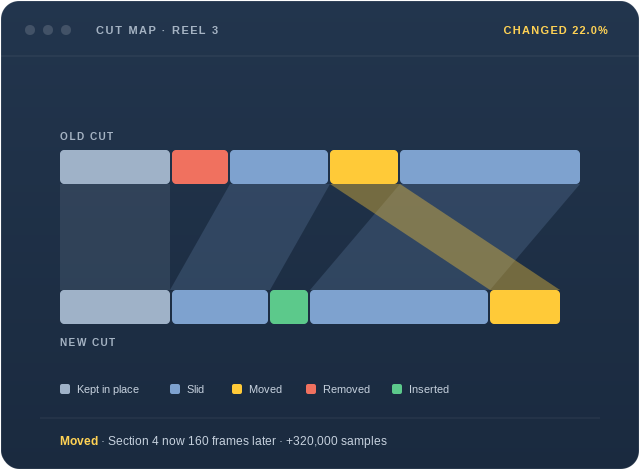
A new picture lock arrives and the sound has to follow. CutTrace reads both versions of the reel and sorts every part of the cut into what happened to it, measured in frames and samples.
WHAT IT DOES
Read the change, share it with the cutting room, and apply it to a copy of your session.
CutTrace reads the picture layers of both AAFs, not the editor’s audio clips, and reports how many frames and samples each section moved.
A summary, a cut map of old and new lanes, warnings and the editor’s markers. The searchable change list describes every change in plain language.
CSV or TSV, a CMX3600 change EDL, marker files, a printable HTML report, and a head-to-tail change note in feet+frames or frames.
With Pro Tools 2023.9 or newer, CutTrace uses Avid’s PTSL scripting interface. After checks, a dry run and one confirmation, it applies the whole change list to a renamed copy of the open session. The original session file is never edited.
FOUR STEPS
The same four steps for every reel.
Drop the old and the new AAF on their boxes and click Compare.
Read the summary, the cut map, the change list, the warnings and the editor’s markers.
Download the files the cutting room or the audio team need.
Connect to the open session, choose tracks, run the checks and the dry run, then confirm once.
REQUIREMENTS
Comparing, reviewing and exporting need no Pro Tools. The app is signed with a Developer ID and notarized by Apple.
EARLY ACCESS · NOW OPEN
CutTrace is in early access for post-production audio teams. Request access and I’ll get in touch by email. Your feedback will shape what comes next.
Early access is free to join.
PRIVACY
Everything runs locally on your Mac. The CutTrace app never contacts the internet, and your AAFs, change lists and sessions never leave your machine.
The form above sends your name, email address, studio or role, Pro Tools version and any note you add to me@isazaly.com through the website’s email delivery provider. The website doesn’t keep a separate copy. These details are used only for early access and to contact you about it. To have your request deleted, email me@isazaly.com with the subject “CutTrace Early Access”.
This page has no advertising or analytics scripts, tracking pixels, third-party fonts or cookies of its own. Like any website, the host may process standard connection information, such as your IP address, to deliver and protect it.
CREATED BY TC. ISAZALY ISA
Ask about your workflow, your formats or early access.